Part 5: Same Scenario as a Durable Workflow
What you'll have at the end of this part: the fill-a-shift coordination from Part 4 running as a raisin:Flow. Candidates are asked one by one via inbox approval tasks with accept and decline buttons and deadlines, the first accepter is assigned, the manager is notified. Plus the task panel wired into the app, and the agent starting the workflow conversationally.
Chat coordination works, but the process state lives in model context. The workflow variant moves the process into the engine: it survives restarts, enforces deadlines, and leaves an audit trail. Every ask is a node with who, when, and what was answered. Nothing in this part needs a model, so you can follow it without an API key.
The flow definition
/flows/fill-shift is a raisin:Flow node; its workflow_data is the designer format. From package/content/functions/flows/fill-shift/.node.yaml (comments trimmed):
node_type: raisin:Flow
properties:
  name: fill-shift
  title: Fill Shift
  enabled: true
  workflow_data:
    version: 1
    error_strategy: fail_fast
    nodes:
      # 1. Who could take this shift? Available on the day + registered
      #    identity user (their home path becomes the task assignee).
      - id: pick_candidates
        node_type: raisin:FlowStep
        properties:
          action: "Pick candidates for {{ input.shift_path }}"
          function_ref: /lib/shiftboard/pick-candidates
          arguments:
            shift_path: "${input.shift_path}"
          timeout_ms: 120000

      # 2. Ask each candidate in order; `until` stops after the first accept.
      - id: ask_each
        node_type: raisin:FlowContainer
        container_type: loop
        loop:
          over: "${steps.pick_candidates.candidates}"
          item: candidate
          index: candidate_index
          max_iterations: 10
          until: 'steps.ask_candidate.action == "accept"'
        children:
          - id: ask_candidate
            node_type: raisin:FlowStep
            properties:
              action: "Can you take {{ steps.pick_candidates.shift_title }} ({{ steps.pick_candidates.day }} {{ steps.pick_candidates.start }}-{{ steps.pick_candidates.end }})?"
              step_type: human_task
              task_type: approval
              assignee: "${candidate.user_path}"
              task_description: >-
                Hi {{ candidate.name }} - the {{ steps.pick_candidates.shift_title }}
                shift ({{ steps.pick_candidates.day }}
                {{ steps.pick_candidates.start }}-{{ steps.pick_candidates.end }},
                {{ steps.pick_candidates.location }},
                {{ input.shift_path }}) is open. Can you take it?
              priority: 4
              due_in_seconds: 300
              timeout_edge: resolve_accepter
              options:
                - { value: accept, label: Accept, style: success }
                - { value: decline, label: Decline, style: danger }

      # 3. Pair loop results with the candidate list: who accepted/declined.
      - id: resolve_accepter
        node_type: raisin:FlowStep
        properties:
          action: Determine who accepted
          function_ref: /lib/shiftboard/resolve-accepter
          arguments:
            candidates: "${steps.pick_candidates.candidates}"
            results: "${steps.ask_each.results}"
            shift_path: "${input.shift_path}"
            shift_title: "${steps.pick_candidates.shift_title}"
            # ... day, start, end, location for the summary text ...
          timeout_ms: 120000

      # 4. Somebody accepted -> assign them; no match skips the container.
      - id: assign_or_report
        node_type: raisin:FlowContainer
        container_type: or
        rules:
          - condition: "steps.resolve_accepter.accepted == true"
            next_step: assign_shift
        children:
          - id: assign_shift
            node_type: raisin:FlowStep
            properties:
              action: "Assign {{ steps.resolve_accepter.accepter_name }} to {{ input.shift_path }}"
              function_ref: /lib/shiftboard/assign-shift
              arguments:
                shift_path: "${input.shift_path}"
                staff_name: "${steps.resolve_accepter.accepter_name}"
              timeout_ms: 120000

      # 5. Always report the outcome to the manager - best effort.
      - id: notify_manager
        node_type: raisin:FlowStep
        properties:
          action: Report the outcome to the manager
          function_ref: /lib/shiftboard/message-staff
          arguments:
            staff_email: planner@example.com
            message: "${steps.resolve_accepter.summary}"
          timeout_ms: 120000
          continue_on_fail: true
Read it top to bottom and you have the whole process:
pick_candidates: a function step (pick-candidates) loads the shift and filters staff who are available on that day and reachable, resolving each to their identity-user home path. That path becomes the task assignee.ask_each: a loop container (over/item/until) whose body is a single human task. Thehuman_taskstep pauses the flow until the candidate clicks Accept or Decline in their inbox, or the 5-minute deadline (due_in_seconds: 300) expires;timeout_edgethen routes toresolve_accepter. Candidates are asked one at a time, anduntilstops the loop at the first accept.resolve_accepter: pairs the loop output (${steps.ask_each.results}, one human response per asked candidate, in order) back with the candidate list.assign_or_report: an or-container. If someone accepted, runassign_shift, the sameassign-shiftfunction the chat agent uses as a tool; otherwise skip.notify_manager: always messages the manager with the outcome.continue_on_fail: truekeeps a delivery problem from failing the flow. Also the samemessage-stafffunction from Part 4.
The same functions serve as agent tools and workflow steps. You write the capability once.
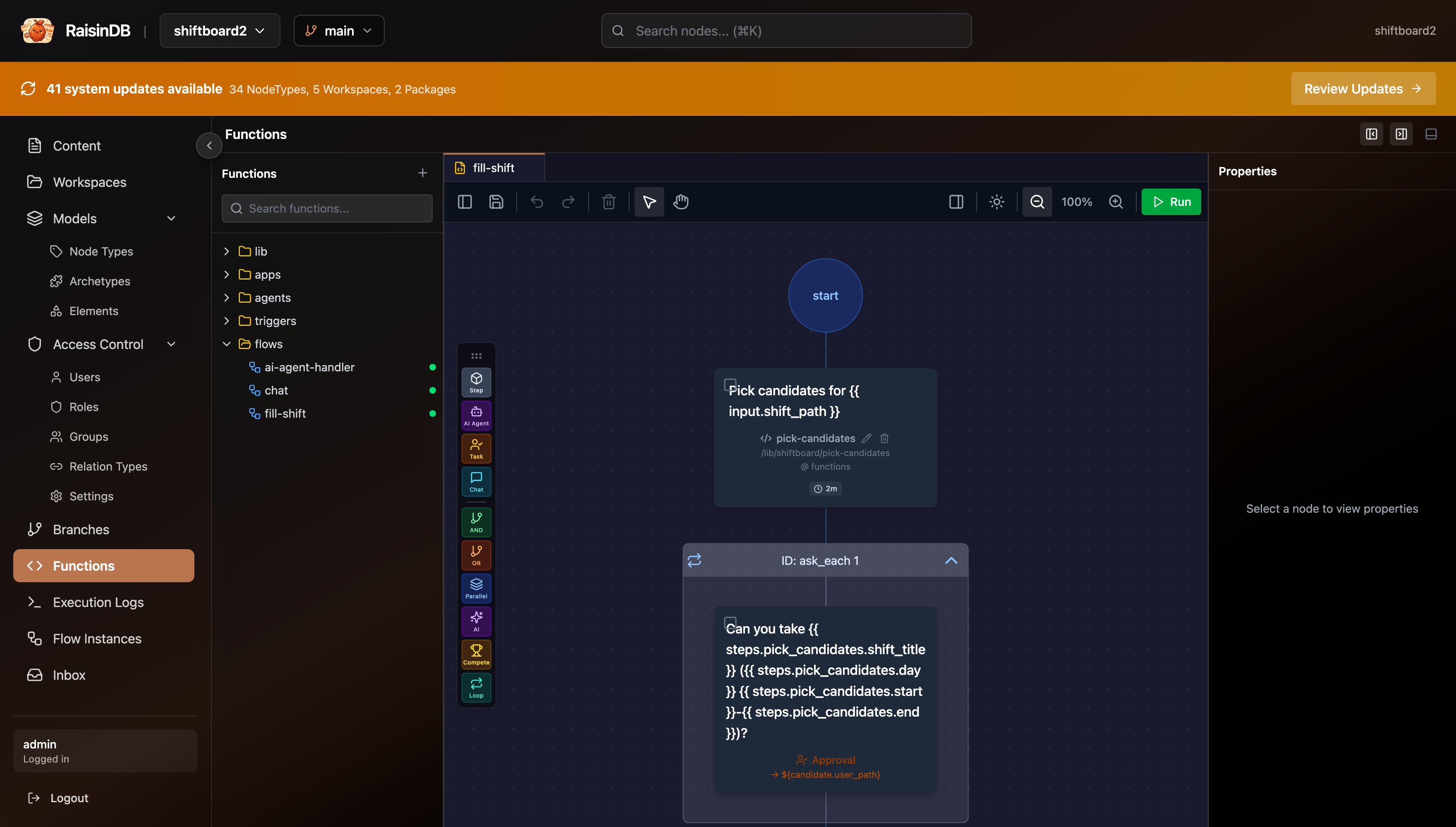 The fill-shift flow in the visual designer. The YAML above is the designer's storage format.
Start a run
You can start the flow directly, without the agent:
curl -s -X POST http://localhost:8081/api/flows/shiftboard/run \
  -H "Authorization: Bearer $RAISINDB_TOKEN" -H 'content-type: application/json' \
  -d '{"flow_path":"/flows/fill-shift","input":{"shift_path":"/shifts/sat-morning"}}'
{"instance_id":"2e6a8b56-3aa0-4d6a-8e3b-d346cc78b1ab","job_id":"zNcWdSorYKqi7uBAa3WTp","status":"queued"}
In the SDK this is new FlowClient(httpBase, repo, authManager).run('/flows/fill-shift', { shift_path }). GET /api/flows/{repo}/instances/{instance_id} shows the instance: its status (waiting while a task is open), the loop state, and step_outputs for every finished step.
Inbox tasks are nodes in the user's inbox
When the flow reaches the human_task step, the engine creates a raisin:InboxTask node under the assignee's home inbox in the raisin:access_control workspace and pauses. Tasks are just nodes the logged-in user can read; no task-UI framework is required. Log in as Anna and list her pending tasks:
curl -s "http://localhost:8081/api/inbox/shiftboard?status=pending" \
  -H "Authorization: Bearer $ANNA_TOKEN"
{
  "assignee": "/users/internal/anna-at-example-com",
  "count": 1,
  "tasks": [
    {
      "id": "dDPKqOu3kdRWTgKDEGNYd",
      "path": "/users/internal/anna-at-example-com/inbox/task-ask_candidate-83a45845eebf-it0",
      "task_type": "approval",
      "title": "Can you take Saturday Morning (saturday 08:00-14:00)?",
      "description": "Hi Anna - the Saturday Morning shift (saturday 08:00-14:00, Terrace, /shifts/sat-morning) is open. Can you take it?",
      "assignee": "/users/internal/anna-at-example-com",
      "status": "pending",
      "priority": 4,
      "due_in_seconds": 300,
      "due_at": "2026-09-06T18:43:09.135479+00:00",
      "created_at": "2026-09-06T18:38:09.135481+00:00",
      "options": [
        { "value": "accept",  "label": "Accept",  "style": "success" },
        { "value": "decline", "label": "Decline", "style": "danger" }
      ],
      "flow_instance_id": "2e6a8b56-3aa0-4d6a-8e3b-d346cc78b1ab",
      "step_id": "ask_candidate"
    }
  ]
}
The title and description are the step's action and task_description templates, rendered. The caller's bearer token scopes the list to their own inbox, so Cara sees nothing yet: candidates are asked sequentially.
Answering is one request. The server checks that the caller is the assignee, flips the node to completed, and resumes the waiting flow:
curl -s -X POST http://localhost:8081/api/inbox/shiftboard/tasks/dDPKqOu3kdRWTgKDEGNYd/complete \
  -H "Authorization: Bearer $ANNA_TOKEN" -H 'content-type: application/json' \
  -d '{"response":{"action":"decline"}}'
{
  "task_id": "dDPKqOu3kdRWTgKDEGNYd",
  "task_path": "/users/internal/anna-at-example-com/inbox/task-ask_candidate-83a45845eebf-it0",
  "status": "completed",
  "flow": { "instance_id": "2e6a8b56-3aa0-4d6a-8e3b-d346cc78b1ab", "job_id": "X7VbKjN2Dtov9rCIKl7-5" }
}
A moment later Cara's inbox holds the next task. The flow sees each decision as __human_response.action (plus completed_by and task_path), which is what the loop's until condition and resolve-accepter read.
The in-app task panel
The Shiftboard frontend renders pending tasks as a card list above the chat. TaskPanel.svelte is generic: one button per entry in the task's options array, nothing shift-specific. Tasks without options get a single "Mark done" button.
<!-- TaskPanel.svelte: buttons driven entirely by each task's options array -->
{#each tasks.tasks as task (task.path)}
  <li class="task-card">
    <span class="task-title">{task.title}</span>
    ...
    {#each optionsFor(task) as option}
      <button onclick={() => tasks.complete(task.id, option.value)}>
        {option.label}
      </button>
    {/each}
  </li>
{/each}
Three pieces wire it into the app (src/lib/stores/tasks.svelte.ts):
- SSR seed.
+page.server.tsloads the pending list alongside the board (InboxApi.listTasks({ status: 'pending' })), so the cards are part of the first HTML response. - Live updates. The app's single inbox subscription from Part 3 (
${home}/inbox/**) forwardsraisin:InboxTaskevents to the task store: a created or updated task with statuspendingupserts a card, any other status removes it. - Complete. Each button posts the chosen value with the user's own bearer token:
// tasks.svelte.ts: optimistic removal with rollback on error
async complete(taskId: string, value: string): Promise<void> {
  const idx = this.tasks.findIndex((t) => t.id === taskId);
  if (idx < 0) return;
  const removed = this.tasks[idx];
  this.tasks = this.tasks.filter((t) => t.id !== taskId);
  try {
    // POST /api/inbox/{repo}/tasks/{taskId}/complete  { response: { action } }
    await getInbox().completeTask(taskId, { action: value });
  } catch (err) {
    const restored = [...this.tasks];                       // roll back
    restored.splice(Math.min(idx, restored.length), 0, removed);
    this.tasks = restored;
    this.error = err instanceof Error ? err.message : String(err);
  }
}
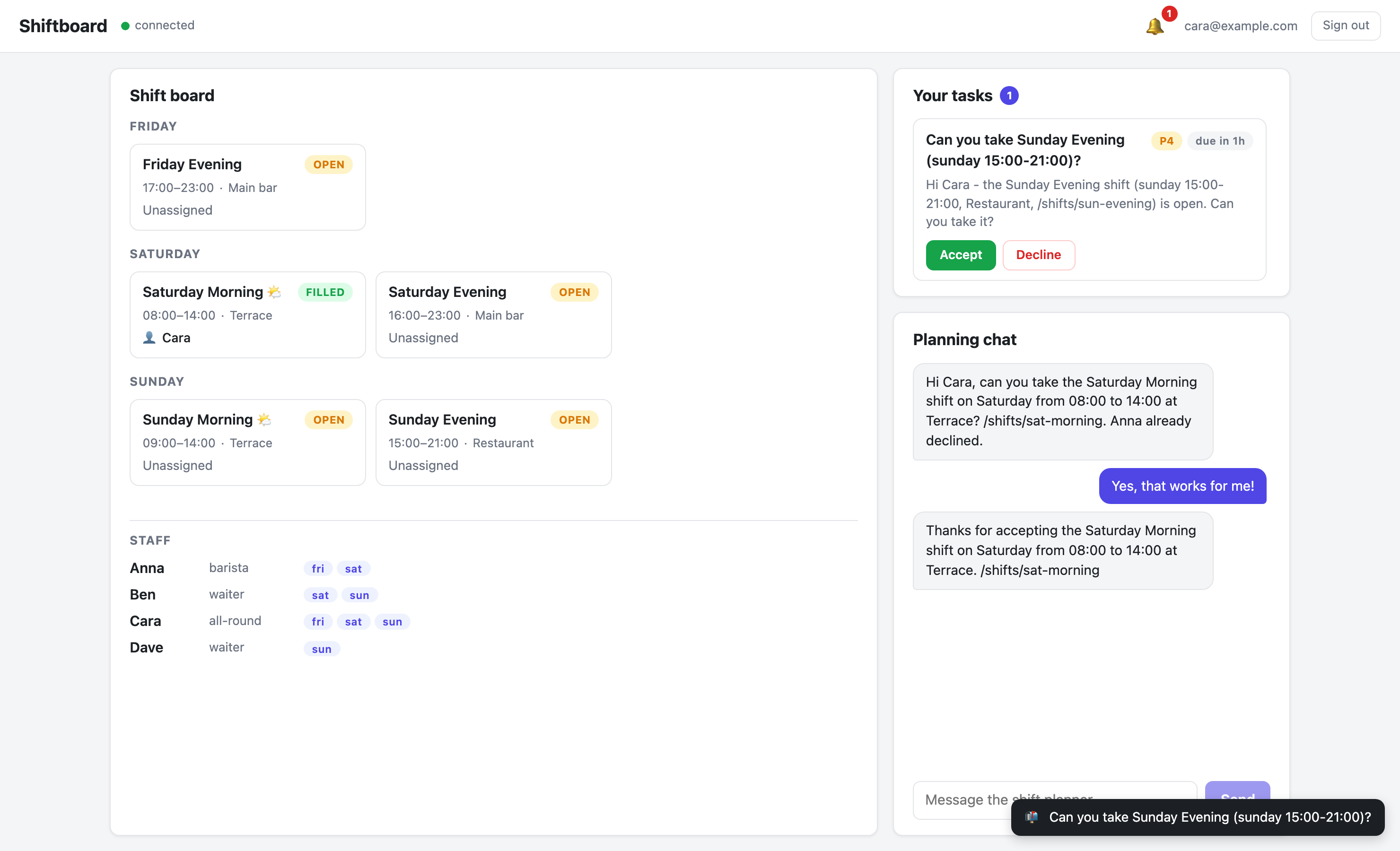 Anna's view: the approval task as a card with Accept/Decline buttons, deadline chip included.
The agent starts the workflow
The bridge between both worlds is the agent's start-shift-fill tool. Tell the agent:
Start the fill-shift workflow for the Sunday evening shift.
Instead of chatting with staff itself, it calls the tool, which starts the flow from inside the function runtime:
// start-shift-fill/index.js (trimmed)
const run = await raisin.flows.run('/flows/fill-shift', { shift_path });

return {
  instance_id: run.instance_id,
  status: run.status || 'queued',
  message: 'Fill-shift workflow started for ' + shift_path + '. ...',
};
raisin.flows.run is fire-and-forget and returns { instance_id, job_id, status }, the same shape as the HTTP endpoint above. The system prompt routes the intent: phrases like "via tasks", "with a workflow", or "a tracked process" trigger start-shift-fill; a plain "fill the shift" uses the Part 4 chat protocol. The agent reports the instance id, and the coordination continues in the background, independent of the chat session.
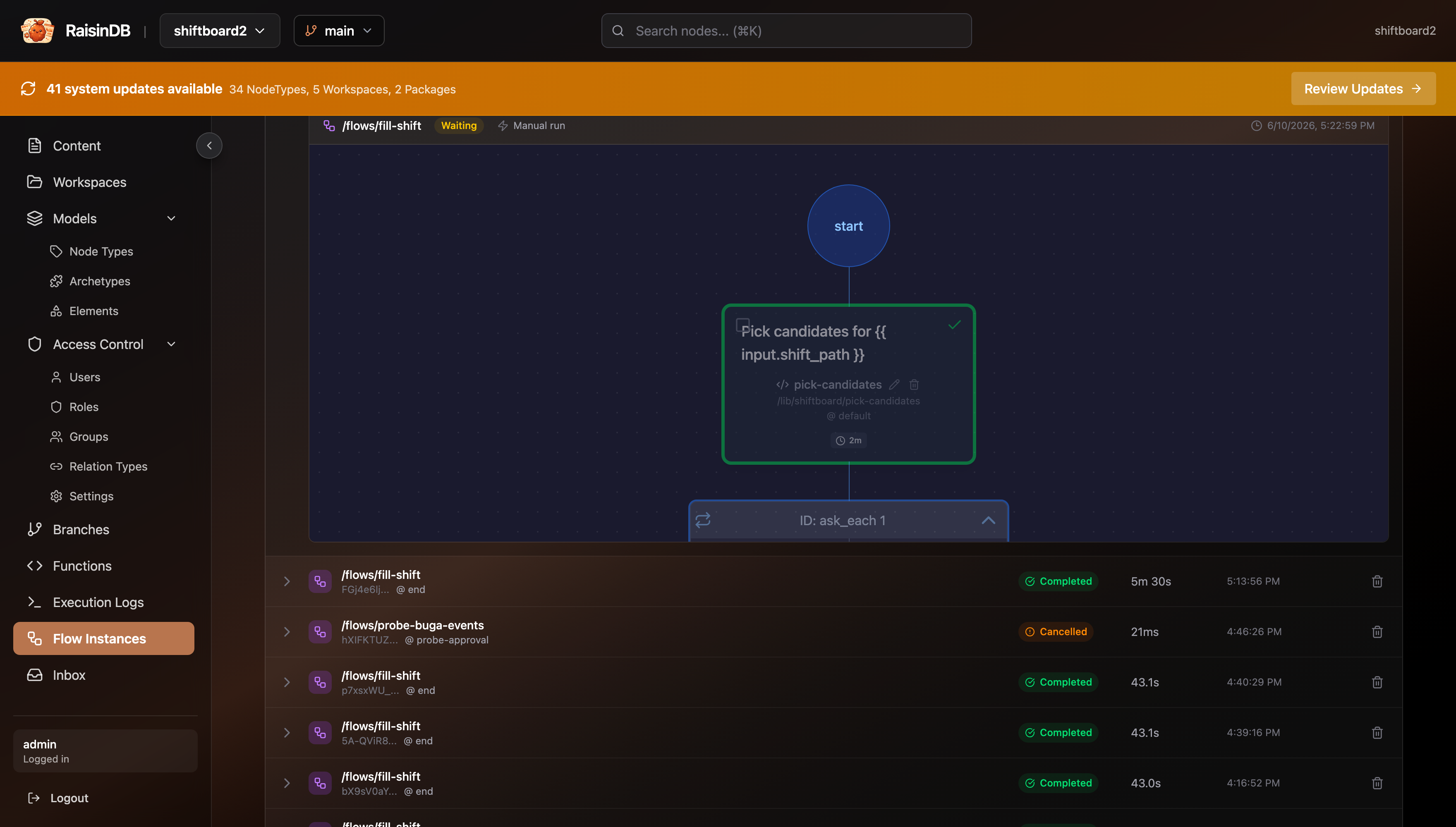 The flow instance: every step, every human response, timestamps. The audit trail chat can't give you.
Chat agent vs. workflow
| Chat coordination (Part 4) | Workflow (Part 5) | |
|---|---|---|
| Process state | Model context, scattered across threads | Engine-owned, survives restarts |
| Deadlines | None; a silent staff member stalls the process | due_in_seconds + timeout_edge, enforced |
| Audit | Re-read the chat threads | Every ask is a task node with who/when/what |
| Staff UX | Free-text reply, interpreted by the model | Accept/Decline buttons, unambiguous |
| Flexibility | Handles anything you can phrase | Exactly the modeled process |
| Model cost | Every hop is a model call | Zero model calls once started |
They compose: the agent is the conversational front door, the workflow is the durable back office. Use chat for judgment, workflows for process.
Prove it headlessly, without a model
workflow-test.mjs drives the entire flow through the engine, deterministically and for free. It resets /shifts/sun-evening, starts the flow via FlowClient, checks that Anna's inbox gets the approval task and Cara's does not yet, declines as Anna via POST /api/inbox/{repo}/tasks/{id}/complete, checks that Cara gets her task, accepts as Cara, and asserts the flow completed with the shift filled by Cara and the outcome message in the manager's inbox:
npm run workflow-test
[flow] /flows/fill-shift started for /shifts/sun-evening -> instance 3a9e4f9e-...
[inbox] Anna's task: "Can you take Sunday Evening (sunday 15:00-21:00)?"
[check] Task shape OK; Cara not asked yet (sequential ask)
[anna@example.com] task completed (decline) -> resume job IX1l4JXbQobjWx0pnrKdC
[inbox] Cara's task: "Can you take Sunday Evening (sunday 15:00-21:00)?"
[cara@example.com] task completed (accept) -> resume job S_RGARGWMy6DFXVr_2VBt
[flow] completed; resolve_accepter -> {"accepter_name":"Cara","declined_names":["Anna"],"accepted":true,...}
[board] /shifts/sun-evening -> status=filled, assignee=Cara
[manager inbox] Cara accepted Sunday Evening (sunday 15:00-21:00, Restaurant) via inbox task and has been assigned. Declined before that: Anna.
The script first re-runs setup.mjs against the repo, which needs the admin credentials (RAISIN_URL, RAISIN_REPO, RAISIN_USER, RAISIN_PASSWORD).
Where to go next
- Workflows overview and Human-in-the-loop: the full flow-definition and task model behind Part 5.
- JavaScript Client reference:
RaisinClient, events, chat, flows, and the realtime inbox. - Sync and Watch: the live dev loop from Part 3 in depth.
- CLI commands: everything you used in Part 1.
One piece remains. Chat handles one shift; a workflow handles one shift durably. In Part 6 the manager says "fill all open weekend shifts", and a plan-enabled agent proposes an approvable task list that starts one of these workflows per shift.