Workspaces
A workspace is a named container of nodes inside a repository. A repository typically has several: one for site content, one for assets, one for users and roles, one for functions. All workspaces in a repository share the same branches and revision history, so a branch or a merge covers every workspace at once. Workspaces are unrelated to tenants; see Multi-Tenancy for how customers are kept apart.
What a workspace is
In the Admin Console, workspaces are shown as cards with their purpose and the NodeTypes they accept:
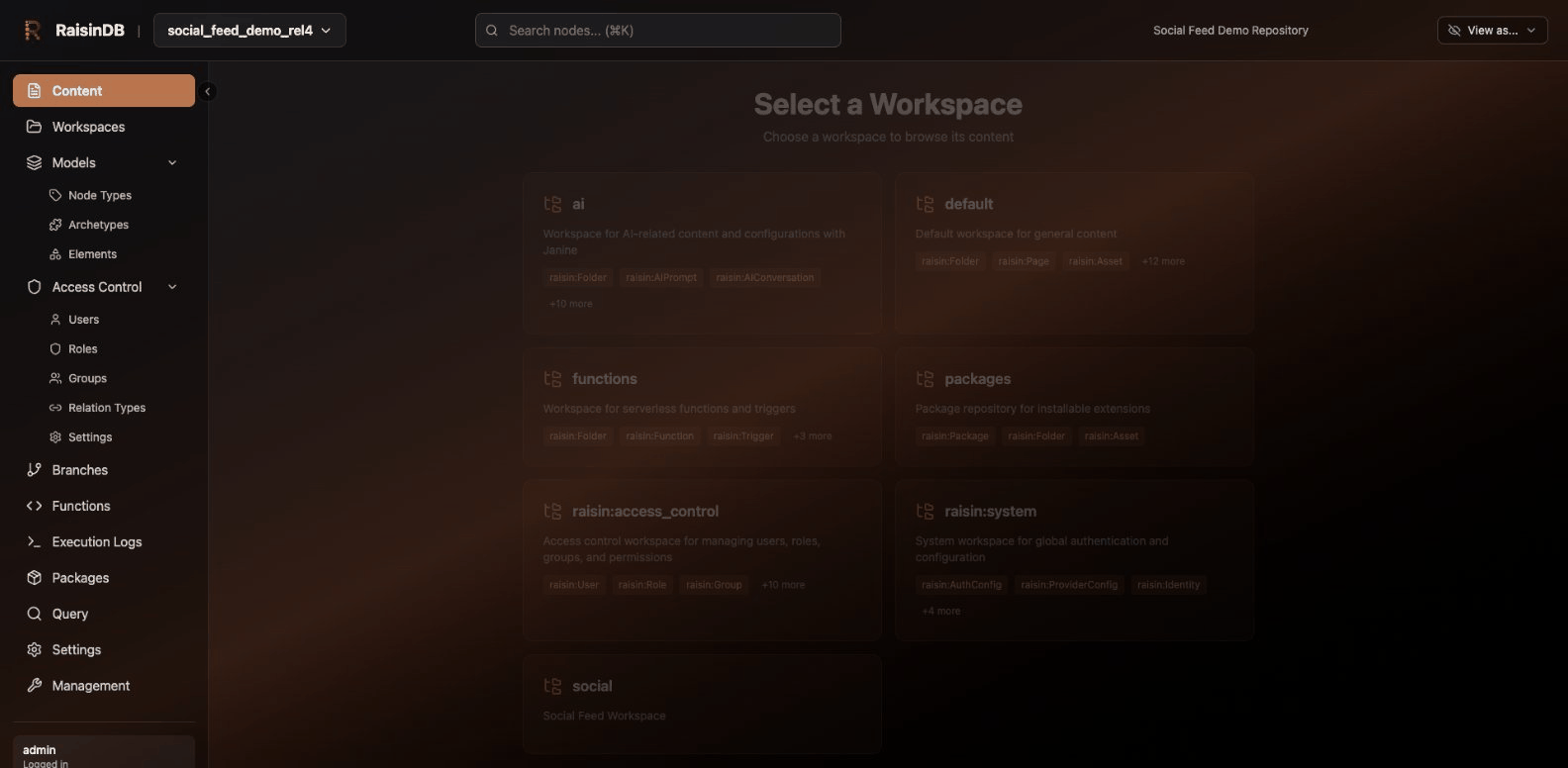
In SQL, each workspace is a table. Quote the name, since most workspace names contain characters such as : or -.
SELECT path, node_type FROM 'site';
SELECT path, node_type FROM 'raisin:access_control' WHERE node_type = 'raisin:User';
Over HTTP, the workspace is part of every node URL:
/api/repository/{repo}/{branch}/head/{workspace}/{path}
A workspace record looks like this:
{
  "name": "site",
  "description": "Marketing site",
  "allowed_node_types": ["raisin:Folder", "blog:Article"],
  "allowed_root_node_types": ["raisin:Folder", "blog:Article"],
  "depends_on": [],
  "initial_structure": null,
  "created_at": "2026-09-06T18:33:16.528620+00:00",
  "updated_at": null,
  "config": { "default_branch": "main", "node_type_pins": {} }
}
| Field | Meaning |
|---|---|
allowed_node_types | NodeTypes that may exist anywhere in the workspace. A write with any other type is rejected. |
allowed_root_node_types | NodeTypes that may sit directly under the workspace root. |
initial_structure | Nodes created once, when the workspace is created ({"children": [...]}). |
config.default_branch | The branch used when the workspace is first initialized. |
config.node_type_pins | Optional map of NodeType name to revision. A pinned workspace keeps resolving that NodeType at the pinned revision even after the NodeType is republished. |
config.builtin_indexes | Optional switches for the built-in indexes, all on when absent. {"children_by_created_at": false} turns off the built-in folder index that serves CHILD_OF(...) ORDER BY created_at. |
compound_indexes | Optional compound indexes owned by the workspace. They hold every node of the workspace whatever its type, so they also serve queries that name no node type. Absent when the workspace declares none. |
depends_on | Informational list of other workspaces this one relies on; it is stored but not enforced. |
Built-in workspaces
Every repository is created with a set of system workspaces. The ones you will meet most often:
| Workspace | Holds |
|---|---|
default | General content (raisin:Folder, raisin:Page, raisin:Asset, ...) |
raisin:system | Authentication configuration, identities, sessions, integrations, flow instances |
raisin:access_control | Users, roles, groups, profiles, security configuration |
functions | Serverless functions, triggers and flows, under /lib, /apps and /triggers |
packages | Installed package records |
ai | AI agents, prompts and conversations |
job_activity | One node with the repository's background-job activity |
They are ordinary workspaces, so you can query them:
SELECT path, node_type FROM 'raisin:access_control' LIMIT 5;
{"columns":["path","node_type"],
 "rows":[{"path":"/config","node_type":"raisin:AclFolder"},
         {"path":"/config/default","node_type":"raisin:SecurityConfig"},
         {"path":"/config/stewardship","node_type":"raisin:StewardshipConfig"},
         {"path":"/users","node_type":"raisin:AclFolder"},
         {"path":"/users/system","node_type":"raisin:AclFolder"}]}
NodeTypes, archetypes and element types are not nodes. They live in their own store and are managed through the NodeTypes API or SQL DDL, not by querying raisin:system.
Creating a workspace
There is no DDL statement for workspaces; besides the API below, INSERT and UPDATE on the Workspaces schema table create and change one. Create or replace one with a PUT to the workspaces endpoint (operator or superadmin token required). The name in the URL wins over the name in the body, and a successful call returns 204 No Content.
curl -X PUT http://localhost:8080/api/workspaces/myrepo/site \
  -H "Authorization: Bearer $TOKEN" -H 'content-type: application/json' \
  -d '{
    "name": "site",
    "description": "Marketing site",
    "allowed_node_types": ["raisin:Folder", "blog:Article"],
    "allowed_root_node_types": ["raisin:Folder"],
    "initial_structure": {
      "children": [
        { "name": "pages", "node_type": "raisin:Folder", "properties": { "title": "Pages" } }
      ]
    }
  }'
Creating a workspace also creates its root node and the initial_structure children, so the workspace is immediately queryable:
SELECT path, node_type FROM 'site';
{"columns":["path","node_type"],"rows":[{"path":"/pages","node_type":"raisin:Folder"}],"row_count":1}
The other management calls:
# List workspaces (paginated: {"items": [...], "page": {...}})
curl http://localhost:8080/api/workspaces/myrepo -H "Authorization: Bearer $TOKEN"

# Read one
curl http://localhost:8080/api/workspaces/myrepo/site -H "Authorization: Bearer $TOKEN"

# Read or replace only the config block
curl http://localhost:8080/api/workspaces/myrepo/site/config -H "Authorization: Bearer $TOKEN"
curl -X PUT http://localhost:8080/api/workspaces/myrepo/site/config \
  -H "Authorization: Bearer $TOKEN" -H 'content-type: application/json' \
  -d '{"default_branch": "main", "node_type_pins": {}}'
A workspace can carry its own compound indexes in the same body:
{
  "name": "site",
  "allowed_node_types": ["raisin:Folder", "blog:Article"],
  "allowed_root_node_types": ["raisin:Folder"],
  "compound_indexes": [
    {
      "name": "folder_by_updated",
      "columns": [
        { "property": "__parent_path", "column_type": "String" },
        { "property": "__updated_at", "column_type": "Timestamp" }
      ],
      "has_order_column": true
    }
  ]
}
To switch the built-in folder index off, set "config": { "builtin_indexes": { "children_by_created_at": false } } in the same body (or PUT the config block alone).
Every folder listing ordered by creation time is index-served without any of this; a workspace index is for other sort columns or extra filters, and an __updated_at index is rewritten on every update. See Indexing.
Packages can also ship workspaces: a workspaces/site.yaml file with the same fields is created on install, and a manifest's workspace_patches block can add allowed NodeTypes to a workspace that already exists. See Define the Schema.
There is currently no endpoint or statement that deletes a workspace.
Allowed NodeTypes
The two allow-lists are enforced on every write, whether it arrives over HTTP, WebSocket or SQL:
curl -X POST http://localhost:8080/api/repository/myrepo/main/head/site/ \
  -H "Authorization: Bearer $TOKEN" -H 'content-type: application/json' \
  -d '{"name":"x","node_type":"blog:Article","properties":{"title":"t"}}'
{"code":"VALIDATION_FAILED",
 "message":"Workspace 'site' does not allow root nodes of type 'blog:Article'. Allowed root types: [\"raisin:Folder\"]"}
A PUT with a wider list is how you open a workspace to a new type. Keep allowed_root_node_types narrower than allowed_node_types when you want a fixed set of top-level folders.
Using workspaces
Reads and writes name the workspace explicitly. In SQL:
INSERT INTO 'site' (path, node_type, name, properties)
VALUES ('/pages/hello', 'blog:Article', 'hello', '{"title": "Hello"}'::jsonb);

SELECT path, properties->>'title' AS title FROM 'site' WHERE node_type = 'blog:Article';
Over HTTP:
curl -X POST http://localhost:8080/api/repository/myrepo/main/head/site/pages \
  -H "Authorization: Bearer $TOKEN" -H 'content-type: application/json' \
  -d '{"name":"hello","node_type":"blog:Article","properties":{"title":"Hello"}}'
A POST to a path creates a child of that node and answers {"node": {...}}; a POST to the workspace root (.../head/site/) creates a root-level node and answers the node itself.
One SQL statement can read several workspaces by joining their tables (UNION is not supported):
SELECT a.path AS page, b.path AS other
FROM 'site' a JOIN 'archive' b ON a.node_type = b.node_type;
Relations can cross workspaces. Name the workspace on each side of a RELATE:
RELATE FROM path='/pages/hello' IN WORKSPACE 'site'
    TO path='/header.jpg' IN WORKSPACE 'assets'
  TYPE 'FEATURED_IMAGE';
Workspaces and branches
Branches belong to the repository, not to a workspace. A branch created with CREATE BRANCH 'feature/x' FROM 'main' carries every workspace, and a MERGE BRANCH brings back changes from all of them. The branch is part of every HTTP URL (/api/repository/{repo}/{branch}/head/{workspace}/...) and of the SQL endpoint (POST /api/sql/{repo}/{branch}).
Access control
Permissions are granted per role and can be limited to a workspace. A role's permission entry names the workspace it applies to:
permissions:
  - path: "**"
    operations: ["read"]
    workspace: "site"
The built-in anonymous role uses exactly this shape to make one workspace publicly readable while everything else stays closed. See Access Control.
Patterns that work well
- One workspace per kind of content.
site,assets,customersandconfigare easier to reason about, and to secure, than one large tree. - Use branches for staging, not workspaces. Draft and published states are the same nodes on different branches, which is what merge and time travel are for. Copying nodes between a
draftsand apublishedworkspace loses that history. - Use tenants for customer isolation, not workspaces. Tenants are isolated at the storage-key level and cannot be crossed by a query; a workspace can.
- Keep the root allow-list short. A handful of root folders with a wider set of allowed child types gives editors a stable top level.
Next steps
- Nodes for what goes into a workspace
- Access Control for workspace-scoped permissions
- Branches and Tags for versioning across workspaces
- Define the Schema for shipping workspaces in a package